
Your trusted platform for link management, elevated QR code
experiences, and dynamic Link-in-Bio solutions.


Turn your storefront into an inviting digital space. By adding QR codes to your window displays, you can easily connect people who walk by with your website, special offers, or online store. It’s a simple way to make your business more interactive and create a smooth experience from the street to your site.


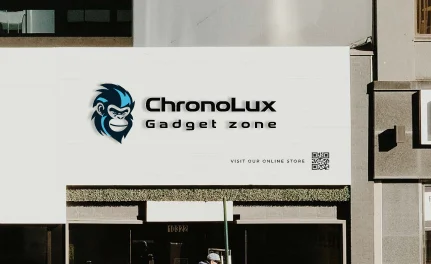


Make your shop windows interactive by letting customers scan for instant offers, learn more about your products, and easily connect with your business online. This simple tool helps you attract attention, provide a better experience, and keep track of how people engage with your storefront.
The Industrial Revolution made flat glass easier to obtain, and as demand for goods grew, stores in Europe and America began using large glass windows to showcase their best products, creating the first window displays. These displays quickly became a way to attract people into stores. Today, window displays remain popular throughout the year, not just during the holidays. However, with more people using smartphones and online platforms, window designers now include mobile-friendly features in their strategy. QR codes offer a simple and effective way to connect physical displays with the digital world.
With smartphones everywhere, it’s important to keep your marketing fresh and engaging. One simple way to do this is by adding a QR code to your storefront, connecting your physical space to your online content. Storefronts have always aimed to attract attention, and now, with QR codes, people can explore your products without even stepping inside. You can share a mobile catalog, image gallery, or a video about your supply chain with a quick scan. It’s also a great way to display your brand story, contact details, store hours, and more. Plus, with dynamic QR codes, you can track scans in real time and fine-tune your marketing strategy as needed.
Track how your storefront marketing performs with dynamic QR code analytics. See how often your code is scanned, where and when it happens, and which devices people use. These insights help you understand what captures customer attention, so you can refine your displays, update your content, and keep improving your marketing strategy.
Sign up to access the QR code generator and choose the type of QR code you want to add to your storefront. We recommend starting with the URL QR code.
Simply enter your website link, and your QR code will be generated automatically.
Personalize your QR code design by adding a frame and a "Scan Me" label.
Select the colors for your QR code to match your brand or personal style.
Click “Download” to save your QR code as a JPEG file.
Add the QR code to your storefront design.
Today, QR codes are no longer limited to plain black-and-white designs. You can now customize them to match your brand or campaign with creative tools, making them more appealing when placed on storefront windows and other displays. Here are some features available to help your QR code get noticed by customers.
Many QR code users often overlook one important detail, which is adding a short message that explains why people should scan the code. When creating your QR code in Divsly, include a clear call to action such as “join our network,” “contact us,” or “don’t miss our deals.” This simple step can significantly improve engagement and increase the number of scans your code receives.
Enhance your QR code by adding creative frames in different colors and designs to make it more eye-catching. After generating your code, choose from a variety of frames with engaging messages. You can also customize it with your own text, icons, or shapes to encourage action.
Once you’ve customized the frame, shape, and color, you can add your company logo in the center. Our system automatically adjusts the logo size to ensure the QR code remains scannable.
Sign up for Divsly to easily reuse saved QR code designs without starting from scratch. Save your designs as templates and use them in future marketing campaigns.
Divsly provides a short, customizable URL for each generated code that redirects to any page you choose. You can update the link anytime to help differentiate yourself from the competition.
For optimal scanning, the minimum recommended size for your QR code is 2 x 2 cm. Avoid making it smaller, but you can increase the size if needed. Test it with different smartphones and apps to ensure accessibility for all users.
If you're unsure about using QR codes on your storefront, these fictional brand examples might inspire you. See how you can create an eye-catching and creative display using our fully customizable codes.

Shop Local understands the power of promotions to attract and retain customers. When launching its new autumn-winter collection, the store placed a coupon QR code in the window. The call to action encouraged people to scan the code for a great introductory discount. Many also signed up with their emails to receive future offers. Thanks to the dynamic QR code, Shop Local tracked the success of the campaign and easily updated offers and page information to keep customers coming back.

The fictional real estate company Real Build wanted to improve its marketing without relying on expensive methods. Instead of traditional printed listings, the company aimed to offer customers a more interactive experience. They placed a video QR code on their office window with the call to action, “Explore our properties.” Scanning the code took customers to a video playlist featuring detailed tours of each property before they scheduled an in-person viewing.

Flamingo Beach, a tourism agency, created an image gallery displaying destinations, excursions, and activities in its office window. The image gallery QR code directed passersby to a mobile-friendly page where they could zoom in on photos, share them on social media, or download them to their devices. This made it easy for potential travelers to explore options, request quotes, or ask for more details through a custom button. As a result, many visitors were inspired to book their next trip with Flamingo Beach.

A group of North City residents launched a podcast to share the city's customs, myths, and stories. Seeing its tourism potential, the North City council promoted the project by displaying a large vinyl poster featuring an MP3 QR code in the window of its tourist office. The code directed passersby to the latest podcast episode, updated every month. Listeners could then use a custom button to visit the city’s official website, where they could download all episodes from platforms such as Google Play Music, Amazon Music, and other streaming services.

JHP Photographer understands the importance of making its services appealing, versatile, and affordable to stay competitive. To achieve this, the studio added a dynamic URL QR code to its storefront that directed customers to a user-friendly website. The site showcased their best work and allowed potential clients to request quotes and book services through a custom button.

For additional details, check out our
help center.
Smart ways to use QR codes, short links, and analytics to grow faster