
Your trusted platform for link management, elevated QR code
experiences, and dynamic Link-in-Bio solutions.


Infographics often face a challenge because the links they contain aren’t clickable in printed materials or even in digital publications. By adding a QR code, you can make your infographic more interactive and accessible. With just one quick scan, viewers can explore additional details, visit related web pages, or access supporting resources that enhance their overall understanding and engagement.

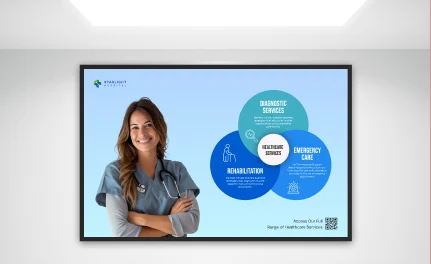


QR codes make it easier for users to access information directly from infographics. By adding a well-designed QR code to your printed or digital infographic, users can instantly reach the linked content without having to manually type or search for a URL. This enhances the overall user experience, increases engagement, and can help attract new customers.
QR codes created with Divsly’s generator can be fully customized to match your brand identity and fit seamlessly into your infographic design. You can choose from a variety of colors, frames, and borders, add your company logo or an image, and include a clear call to action (CTA) that encourages more scans. Whether your infographic is for print or digital use, you can also adjust the QR code size to suit the layout, from small inserts on product packaging to large visual displays on posters or billboards.
Adding a QR code to your infographic can take your marketing to the next level by making your content more interactive and measurable. With Divsly’s generator, you can track how many people scan your code and where the scans come from, helping you understand which infographic designs perform best. This data allows you to refine your visuals, test different calls to action, and ensure your infographics reach the right audience across both print and digital platforms. Whether you’re promoting a product, sharing a report, or raising awareness, QR codes turn your infographic into an actionable and engaging marketing tool.
Infographics are a powerful way to share information through a mix of visuals and text, making data easy to understand and appealing to the viewer. By adding a QR code, you can take your printed or digital infographic beyond static visuals and connect it to interactive content. With just one scan, users can access videos, contact information, social media pages, or additional resources that expand on your story. This combination helps you extend your marketing strategy, engage your audience on multiple platforms, and let users conveniently save the shared information to their devices after viewing your infographic.
One of the biggest advantages of QR codes is their ability to transform traditional printed designs into interactive marketing tools. By adding a QR code to your infographic, brochure, stationery, or billboard, you give customers an easy way to access additional information or exclusive content online. At the same time, your business can track scan data, such as location and time, to measure how effectively each campaign performs. This combination helps modernize your printed materials while giving you valuable insights to improve future designs.
Another reason to use dynamic QR codes in your infographics is that you can update the information linked to your QR code at any time, without changing its appearance or creating a new one. This feature is especially useful for infographics that are already printed or published online, as you can modify the destination link or even change the type of QR code whenever needed, eliminating the need for reprints and saving time and resources.
Sign up to access the QR code generator and choose the type of QR code you want to add to your infographic. We recommend starting with the URL QR code.
Simply enter your website link, and your QR code will be generated automatically.
Personalize your QR code design by adding a frame and a "Scan Me" label.
Select the colors for your QR code to match your brand or personal style.
Click “Download” to save your QR code as a JPEG file.
Insert the final QR code design into your infographic layout before publishing or printing it.
Using QR codes in infographics can greatly enhance your marketing strategy. To do this, you should consider the design and structure of both the QR code and the infographic itself.
For your QR code to be effective, include a short line that explains what users will gain by scanning it. A clear call to action (CTA) motivates people to engage by showing the benefit of scanning, such as accessing detailed information, videos, or exclusive offers linked to your infographic.
The quality and placement of your QR code play an important role in how well it performs, whether on print or digital materials. Make sure the image file is high-resolution, the color contrast is strong enough for smooth scanning, and the design elements such as colors and style align with the overall look of your infographic. This ensures your QR code blends naturally into the design while remaining easy to scan.
When printing your QR code, make sure it’s at least 2 x 2 centimeters. While it’s best not to make it smaller, you can always make it larger to ensure it’s easy to scan from any device.
If you're thinking about using QR codes in infographics but aren't sure how, here are some example campaigns to inspire you.

The consulting firm Connect used QR codes in a multichannel marketing campaign to promote its brand and increase website and social media traffic. The firm added a business QR code to infographics that highlighted the benefits of their consulting services. These infographics were displayed on conference posters, business fair materials, social media ads, and billboards. By scanning the QR code, people could directly access the company’s website, learn more about its offerings, and contact the firm for additional details or to schedule an appointment.

Shop Local, a women’s clothing brand, used infographics in their digital magazine to showcase seasonal fashion trends and influencer collaborations. To make the content more interactive, they added a link list QR code to the infographic, allowing readers to instantly access their Instagram, Facebook, and YouTube channels for tutorials, styling tips, and behind-the-scenes videos. This helped the brand strengthen its engagement and connect its print and digital marketing efforts seamlessly.

The well-known SC School wanted to enhance its marketing by using infographics to showcase student graduation statistics and study plans for each specialization. They created two infographics for billboards, featuring a video QR code that linked to videos with testimonials from students and teachers, providing more information.

The real estate agency Real Build participates in conferences, exhibitions, and other events each year using infographics that showcase properties for sale, along with their locations and details. To make these infographics more interactive, they added an image gallery QR code next to each property description. Attendees could scan the code to view a complete gallery of the property. Real Build also incorporated these QR codes into their office infographics, advertisements, and social media posts to maintain consistency across all marketing materials.

ZenYog, an online diary retailer, aimed to improve the quality of its ingredients by introducing a line of organic products. After conducting research, they launched their “Green Line” and included an infographic on the packaging to highlight the benefits of choosing organic options. The infographic also featured a feedback QR code, enabling customers to share their opinions and experiences with the new product line.

For additional details, check out our
help center.
Smart ways to use QR codes, short links, and analytics to grow faster